Thursday, February 21, 2019

What is storytelling and why should you use it?

Once upon a time, there was a young girl. She was 9 years old and her name was Wende. Wende was incredibly intelligent, yet she had a hard time learning things by heart. No matter how hard she tried, she just could not memorize the planets of the solar system. It just did not stick in her head. One day her teacher told her a story about all the planets. A story about how the sun was lonely and Mercury was his first friend. How Mercury fell madly in love with Venus and how Planet Earth got jealous. After telling her the story, Wende was able to remember all of the planets in the right order. Why? Because of the magic of storytelling. Wende could remember the story and with that, she could remember the planets.

In this blogpost, I will tell you what storytelling is and why it is an important tool to use in the texts on your website. This post will be the first of a series of blog posts about storytelling.

What is storytelling?

The word storytelling pretty much speaks for itself. Storytelling is about telling stories. It is about using stories to engage your audience, or to make something more clear. Photos, pictures and film of course really help to tell a good story too.

Stories have always been a way to communicate. Before people learnt how to write, they would tell each other stories. Stories are much easier to remember than simple facts. That’s why Wende from the story remembered the planets. Also, stories are enjoyable, they stimulate your imagination. That’s why parents tell their children stories. That’s why we like to see movies and read books. People love stories, people are addicted to stories.

Some examples of (great) storytelling

In 2017 I visited a conference and I saw David JP Phillips on stage. He talked about the magical science of storytelling. I was blown away. His tolk was such an inspiration for me. Two weeks later, I had to speak at a WordCamp and I was so very inspired by David’s talk, that I did some storytelling of my own.

Next to using storytelling in presentations, you can use it in writing. Lots of travelblogs, personal blogs or momblogs use storytelling throughout all of their posts. Geraldine de Ruyter has a really funny blog about travel and many other things. Every post is a little story on her blog. But even informational blogs could use storytelling by adding an anekdote or an example. In my post about site structure and why it is important I used the exact same story as in my presentation at the WordCamp.

Storytelling Why use storytelling?

Using storytelling in your blog post will – if you do it the right way – make your post a more engaging one. Your blog post will become something people want to read. Stories increase the attention of your audience.

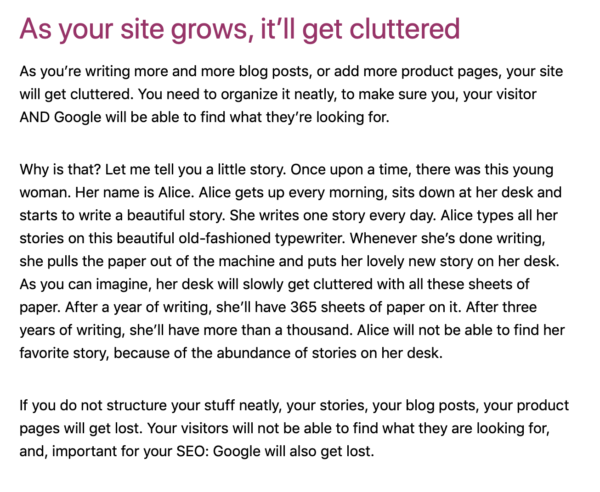
If you use stories the right way, stories will help you to make your message more clear. Stories can help you to provide proof for your argumentation. They can add clarity. My story about Alice (screenshot above) is written in order to help people understand the importance of a clean site structure. This is a rather difficult subject to grasp. A story adds clarity.

Most importantly, people will remember your story, and with that, they’ll remember the message of your post or even your brand. If you use stories in a good way, you could even inspire people to take action. Maybe you’ll inspire people to clean up their website or to get started with storytelling in their blog posts and presentations.

Up next in this series

If you Google ‘storytelling’ you’ll see amazing things. Lots of online storytelling is about brand storytelling. Perhaps I’ll write a blogpost about that in the future. For this series, I’ll be focussing on using storytelling in your writing. And, I will also focus on the topic of storytelling and SEO.

In the next post in this series about storytelling, I want to focus on how to use storytelling in a blogpost. I want to start off by discussing the elements that are necessary for a good story. Also, I will share some practical tips and examples of how to start using storytelling in your blogposts.

If you have nice examples of your own use of storytelling, I would love to see those! Maybe I can even share a few of your examples in one of my next posts!

Read more: Blogging: the ultimate guide »

The post What is storytelling and why should you use it? appeared first on Yoast.

https://ift.tt/2IG4XOj

How to Optimize Keyword Research by Understanding User Intent

Last updated on February 21, 2019 at 06:02 pm

How to Optimize Keyword Research by Understanding User Intent

SEO has become increasingly competitive as the years go by, with new techniques, algorithm updates, and tools that help give you an edge over the competition. There are many ways to craft your own winning strategy with the right combination of tools and techniques, and this certainly rings true for keyword research.

Keyword research will always be the most crucial element in the success of your SEO efforts, especially at a time where search has become more versatile than before. With voice search gaining a more significant presence, the traditional practice of finding keywords that have high search volume is at times not as effective as before. The factors that we have to consider when looking for the right keywords have increased, with user intent becoming one element that makes a difference in your success in search rankings.

When it comes to user intent, there are a number of factors to consider when implementing the right strategy. Here are ways you can optimize your keyword research with user intent in mind.

What is User Intent?

User Intent is the reason, motive, or intention for conducting a search query. User intent looks into why and how users conduct search queries and use this understanding to formulate the appropriate keywords. User intent can be classified into at least 4 types depending on where you look, along with being the most popular queries, and they are as follows:

Commercial – This refers to search terms with the intent of browsing through a variety of brands, products, and websites without conducting a purchase. This type of intent is from users who want to research about the products that they might purchase in the future, and find the best results.

Transactional – Related to Commercial Intent, Transactional Intent refers to users who conduct search queries, with the goal of finding e-commerce websites, and purchasing a product online. This and Commercial Intent tend to be used to search for business and commerce websites.

Navigational – This refers to the intent of searching for a specific website by directly entering their names. This tends to be effective in generating traffic once you have garnered a significant online presence for your brand.

Informational – Informational refers to search queries whose goal is to provide users with information. This information varies from the news, facts, tips, lists, and other related queries. Content such as blog articles and infographics tend to be the target of these keywords.

Understanding User Intent

By understanding how, what, and why people search, you would be able to find the best keywords that would drive organic traffic to any website. There are many ways to help you understand user intent for your keyword research, and some of them are handy tools that you might have used before as well. Here are some of these tools:

Google Trends – One of the more effective keyword and content research tools around, Google Trends allows you to see keywords and topics the generate the most buzz in a specific region. You have the option of tracking their statistics over certain time periods, and even compare each topic or keyword side by side.

Google Trends Filtered Data

Quora – One of the most popular Q&A websites around, Quora is a great place to see user-generated questions that you can use to generate keywords. Quora is a platform that has been used by numerous SEO professionals to generate traffic for their content, and now, its questions can now be used to formulate keywords.

Ahrefs – One of the most effective keyword research tools in the market, Ahrefs is also a great place to find a wide variety of related search terms that you can utilize to formulate terms that would help you generate traffic.

AHRefs Keywords Explorer

Answer the Public – Another top location that would help you find quality search terms and analyze search intent is by using Answer the Public. You have the option of going through numerous types of queries and question types that users would most likely try out.

Online Forums – Sites like Reddit offer a lot of content related to inquiries as well, making it another great platform to analyze user intent. Going around other online forums is also another solid approach, as these have been the best places to ask around the internet for years, providing you with a massive archive of queries waiting to be utilized.

Tinkering with Google or even Facebook Search might also help you find interesting results that allow you to see how people look around on the internet. This makes crowdsourcing for information another viable method of finding unique and genuine results that come from actual users.

Moving away from the traditional

While traditional keyword research is still able to help you find keywords that generate a significant amount of traffic, the arrival of voice search was a signal to a lot of SEOs that this might no longer be an effective method in the near future. This means that we have to diversify our strategies and use fresh methods that would help us find what we are looking for.

While this may lead to bumps along the way, the ultimate reward of experimentation makes it all worth it after a good number of tries. One of the traditional keyword research metrics that is used as a measurement of keyword success is the search volume. While search volumes tend to give you a good assessment of keyword performance, there are times that they might be inaccurate, especially on more specific search terms that might be more helpful for your rankings.

While completely moving away from tried and tested methods is still not advisable, finding new ways to generate keywords that understand user intent allows you to get out of your SEO comfort zone, and create your own unique approach to keyword research.

Create a list or chart of your keywords

Once you have done your research, it is time to categorize each search query and put them in a list or chart, depending on your preference. This allows you to identify each search query accordingly, and even connect each of them to formulate more queries.

It is best to start with single root words and branch out from there. From there, you can add elements such as brand names, key prefixes or suffixes, categories, geotagging, adjectives, and even common phrases used when asking. With a plethora of information mostly consisting of unique search terms, there is no doubt that you might have an overwhelmingly long test after doing this. This is why filtering your list is the most crucial step towards finding the best search queries that would fit your needs.

Key Takeaway

User Intent adds another dimension to keyword research, as it provides us with a fresh approach to generating the best search queries that would how users across the internet perform their search. Along with these important tips, you can also take a look at our previous posts about long-tail keywords and exact search terms, which helps give you a deeper look into how keyword research is changing.

If you have questions and inquiries about Keyword Research and SEO in general, leave a comment below and let’s talk.

https://ift.tt/2ElMPoA

Wednesday, February 20, 2019

Sell Clean

In July of 2006, I first learned of Humpy Wheeler, one of the foremost promotors of NASCAR. He was a guest on NPR’s news quiz show, “Wait Wait! Don’t Tell Me!” And what he did thrilled me. Sell Clean

Humpy talked about running the motor speedway about 12 miles away from the theater where the episode was being filmed. He asked, “You want to come? I’ve got tickets in my pocket.”

The post Sell Clean appeared first on chrisbrogan.com.

https://ift.tt/2T4avpK

Tuesday, February 19, 2019

How Named Anchor Links Optimize Your Search Snippets

Last updated on February 19, 2019 at 05:56 pm

How Fraggles Optimize Your Search Snippets

As a student of SEO, I’ve learned so many things that can affect your online presence over the years, from algorithm updates to various strategies borne out of experimentation. All of these are done just for our websites to show up on the first page of Google’s search results, along with expanding your presence and brand and generate revenue in the ever-expanding digital landscape.

Google’s search snippet has gone through a multitude of changes over the past few years, with the introduction of featured snippets and knowledge graphs providing instant information containing more detailed results. Along with these two features, regular search snippets have also become more versatile as well with the introduction of Named Anchor Links. Here’s what you need to know about Named Anchor Links, how to apply them, and how they can impact your search.

What are Named Anchor Links?

Named Anchor Links are links that can be viewed below the search snippet in Google. These links can direct you to various pages in your website, or a specific section on the webpage itself.

Named Anchor Snippet

This feature allows users to quickly navigate to places they want on a website, providing more opportunities for more webpages to generate traffic. Most search queries have become increasingly specific, especially with the emergence of voice and visual search, and named anchors surely make it even more so than before.

The user experience is crucial when it comes to search results and being more direct can lead to more positive results that can generate more opportunities for conversions and discovering content.

How to apply named anchors

Named anchors appearing on search snippets is possible through content optimization, as Google tends to generate these results based on how they viewed your content. The best way to ensure that names anchors would be present is by making each section of your page clear and well-defined.

This means applying the right H2 and H3 tags on the page, which allows you to see links to different pages on your search snippet, which we were able to do in our website. Content optimization is key to making this work and applying this to your home page and landing pages allow for better navigation. The title tags for these sections must also describe what the user would access upon clicking on them. This means that direct title tags such as “Frequently Asked Questions” or “Best SEO Strategies” are good examples of title tags that are straight to the point and can be read by Google as distinct sections.

Quick navigation, table of contents, and related content sections also work well when it comes to appearing on search snippets. These quick links allow users to be able to view additional content, which can be found in the search snippet, allowing users to click and access multiple web pages. The Fetch as Googlebot option also works as well, which is one of the most effective ways to ensure that your webpage would contain named anchors after some content optimization. The applied changes

Impacting your search

Named anchors not only make navigation and content discovery much more convenient but also benefit traffic as well. Users not only have access to one webpage but also has access to others that they might be interested in taking a look. If you have content that might need an extra traffic boost, having it show up in your quick navigation or related content section would help give it more visibility.

If featured snippets and knowledge graphs provide quick information that lessens the need to click more, named anchors to allow more content to be discovered within your website, providing in-depth information that fits Google’s E-A-T standards.

Key Takeaway

Named anchors may have been a feature that has been around for a long time, it is still a very efficient way of providing more content to the users, along with increasing the visibility of related content. While knowledge graphs and featured snippets are being prioritized by numerous websites, making use of Named Anchor Links is another way of providing information, while improving your search traffic.

If you have questions or inquiries about SEO, leave a comment below and let’s talk.

http://bit.ly/2DWuPzJ

How Fraggles Optimize Your Search Snippets

Last updated on February 19, 2019 at 03:50 pm

How Fraggles Optimize Your Search Snippets

As a student of SEO, I’ve learned so many things that can affect your online presence over the years, from algorithm updates to various strategies borne out of experimentation. All of these are done just for our websites to show up on the first page of Google’s search results, along with expanding your presence and brand and generate revenue in the ever-expanding digital landscape.

Google’s search snippet has gone through a multitude of changes over the past few years, with the introduction of featured snippets and knowledge graphs providing instant information containing more detailed results. Along with these two features, regular search snippets have also become more versatile as well with the introduction of Fraggles, also known as named anchors. Here’s what you need to know about Fraggles, how to apply them, and how they can impact your search.

What are “Fraggles”?

Named anchors, or Fraggles, are links that can be viewed below the search snippet in Google. These links can direct you to various pages in your website, or a specific section on the webpage itself.

Named Anchor Snippet

This feature allows users to quickly navigate to places they want on a website, providing more opportunities for more webpages to generate traffic. Most search queries have become increasingly specific, especially with the emergence of voice and visual search, and named anchors surely make it even more so than before.

The user experience is crucial when it comes to search results and being more direct can lead to more positive results that can generate more opportunities for conversions and discovering content.

How to apply named anchors

Named anchors appearing on search snippets is possible through content optimization, as Google tends to generate these results based on how they viewed your content. The best way to ensure that names anchors would be present is by making each section of your page clear and well-defined.

Related Articles

This means applying the right H2 and H3 tags on the page, which allows you to see links to different pages on your search snippet, which we were able to do in our website. Content optimization is key to making this work and applying this to your home page and landing pages allow for better navigation. The title tags for these sections must also describe what the user would access upon clicking on them. This means that direct title tags such as “Frequently Asked Questions” or “Best SEO Strategies” are good examples of title tags that are straight to the point and can be read by Google.

Quick navigation, table of contents, and related content sections also work well when it comes to appearing on search snippets. These quick links allow users to be able to view additional content, which can be found in the search snippet, allowing users to click and access multiple web pages. The Fetch as Googlebot option also works as well, which is one of the most effective ways to ensure that your webpage would contain named anchors after some content optimization.

Impacting your search

Named anchors not only make navigation and content discovery much more convenient but also benefit traffic as well. Users not only have access to one webpage but also has access to others that they might be interested in taking a look. If you have content that might need an extra traffic boost, having it show up in your quick navigation or related content section would help give it more visibility.

If featured snippets and knowledge graphs provide quick information that lessens the need to click more, named anchors to allow more content to be discovered within your website, providing in-depth information that fits Google’s E-A-T standards.

Key Takeaway

Named anchors may have been a feature that has been around for a long time, it is still a very efficient way of providing more content to the users, along with increasing the visibility of related content. While knowledge graphs and featured snippets are being prioritized by numerous websites, making use of Fraggles is another way of providing information, while improving your search traffic.

If you have questions or inquiries about SEO, leave a comment below and let’s talk.

http://bit.ly/2V7aSx6

Context Clusters in Search Query Suggestions

unsplash-logoSaketh Garuda

Context Clusters and Query Suggestions at Google

A new patent application from Google tells us about how the search engine may use context to find query suggestions before a searcher has completed typing in a full query. After seeing this patent, I’ve been thinking about previous patents I’ve seen from Google that have similarities.

It’s not the first time I’ve written about a Google Patent involving query suggestions. I’ve written about a couple of other patents that were very informative, in the past:

In both of those, the inclusion of entities in a query impacted the suggestions that were returned. This patent takes a slightly different approach, by also looking at context.

Context Clusters in Query Suggestions

We’ve been seeing the word Context spring up in Google patents recently. Context terms from knowledge bases appearing on pages that focus on the same query term with different meanings, and we have also seen pages that are about specific people using a disambiguation approach. While these were recent, I did blog about a paper in 2007, which talks about query context with an author from Yahoo. The paper was Using Query Contexts in Information Retrieval. The abstract from the paper provides a good glimpse into what it covers:

User query is an element that specifies an information need, but it is not the only one. Studies in literature have found many contextual factors that strongly influence the interpretation of a query. Recent studies have tried to consider the user’s interests by creating a user profile. However, a single profile for a user may not be sufficient for a variety of queries of the user. In this study, we propose to use query-specific contexts instead of user-centric ones, including context around query and context within query. The former specifies the environment of a query such as the domain of interest, while the latter refers to context words within the query, which is particularly useful for the selection of relevant term relations. In this paper, both types of context are integrated in an IR model based on language modeling. Our experiments on several TREC collections show that each of the context factors brings significant improvements in retrieval effectiveness.

The Google patent doesn’t take a user-based approach ether, but does look at some user contexts and interests. It sounds like searchers might be offered a chance to select a context cluster before showing query suggestions:

In some implementations, a set of queries (e.g., movie times, movie trailers) related to a particular topic (e.g., movies) may be grouped into context clusters. Given a context of a user device for a user, one or more context clusters may be presented to the user when the user is initiating a search operation, but prior to the user inputting one or more characters of the search query. For example, based on a user’s context (e.g., location, date and time, indicated user preferences and interests), when a user event occurs indicating the user is initiating a process of providing a search query (e.g., opening a web page associated with a search engine), one or more context clusters (e.g., “movies”) may be presented to the user for selection input prior to the user entering any query input. The user may select one of the context clusters that are presented and then a list of queries grouped into the context cluster may be presented as options for a query input selection.

I often look up the inventors of patents to get a sense of what else they may have written, and worked upon. I looked up Jakob D. Uszkoreit in LinkedIn, and his profile doesn’t surprise me. He tells us there of his experience at Google:

Previously I started and led a research team in Google Machine Intelligence, working on large-scale deep learning for natural language understanding, with applications in the Google Assistant and other products.

This passage reminded me of the search results being shown to me by the Google Assistant, which are based upon interests that I have shared with Google over time, and that Google allows me to update from time to time. If the inventor of this patent worked on Google Assistant, that doesn’t surprise me. I haven’t been offered context clusters yet (and wouldn’t know what those might look like if Google did offer them. I suspect if Google does start offering them, I will realize that I have found them at the time they are offered to me.)

Like many patents do, this one tells us what is “innovative” about it. It looks at:

…query data indicating query inputs received from user devices of a plurality of users, the query data also indicating an input context that describes, for each query input, an input context of the query input that is different from content described by the query input; grouping, by the data processing apparatus, the query inputs into context clusters based, in part, on the input context for each of the query inputs and the content described by each query input; determining, by the data processing apparatus, for each of the context clusters, a context cluster probability based on respective probabilities of entry of the query inputs that belong to the context cluster, the context cluster probability being indicative of a probability that at least one query input that belongs to the context cluster and provided for an input context of the context cluster will be selected by the user; and storing, in a data storage system accessible by the data processing apparatus, data describing the context clusters and the context cluster probabilities.

It also tells us that it will calculate probabilities that certain context clusters might be requested by a searcher. So how does Google know what to suggest as context clusters?

Each context cluster includes a group of one or more queries, the grouping being based on the input context (e.g., location, date and time, indicated user preferences and interests) for each of the query inputs, when the query input was provided, and the content described by each query input. One or more context clusters may be presented to the user for input selection based on a context cluster probability, which is based on the context of the user device and respective probabilities of entry of the query inputs that belong to the context cluster. The context cluster probability is indicative of a probability that at least one query input that belongs to the context cluster will be selected by the user. Upon selection of one of the context clusters that is presented to the user, a list of queries grouped into the context cluster may be presented as options for a query input selection. This advantageously results in individual query suggestions for query inputs that belong to the context cluster but that alone would not otherwise be provided due to their respectively low individual selection probabilities. Accordingly, users’ informational needs are more likely to be satisfied.

The Patent in this patent application is:

(US20190050450) Query Composition System
Publication Number: 20190050450
Publication Date: February 14, 2019
Applicants: Google LLC
Inventors: Jakob D. Uszkoreit
Abstract:

Methods, systems, and apparatus for generating data describing context clusters and context cluster probabilities, wherein each context cluster includes query inputs based on the input context for each of the query inputs and the content described by each query input, and each context cluster probability indicates a probability that at a query input that belongs to the context cluster will be selected by the user, receiving, from a user device, an indication of a user event that includes data indicating a context of the user device, selecting as a selected context cluster, based on the context cluster probabilities for each of the context clusters and the context of the user device, a context cluster for selection input by the user device, and providing, to the user device, data that causes the user device to display a context cluster selection input that indicates the selected context cluster for user selection.

What are Context Clusters as Query Suggestions?

The patent tells us that context clusters might be triggered when someone is starting a query on a web browser. I tried it out, starting a search for “movies” and got a number of suggestions that were combinations of queries, or what seem to be context clusters:

The patent says that context clusters would appear before someone began typing, based upon topics and user information such as location. So, if I were at a shopping mall that had a movie theatre, I might see Search suggestions for movies like the ones shown here:

Context Clusters

One of those clusters involved “Movies about Business”, which I selected, and it showed me a carousel, and buttons with subcategories to also choose from. This seems to be a context cluster:

Movies about Business

This seems to be a pretty new idea, and may be something that Google would announce as an availble option when it becomes available, if it does become available, much like they did with the Google Assistant. I usually check through the news from my Google Assistant at least once a day. If it starts offering search suggestions based upon things like my location, it could potentially be very interesting.

User Query Histories

The patent tells us that context clusters selected to be shown to a searcher might be based upon previous queries from a searcher, and provides the following example:

Further, a user query history may be provided by the user device (or stored in the log data) that includes queries and contexts previously provided by the user, and this information may also factor into the probability that a user may provide a particular query or a query within a particular context cluster. For example, if the user that initiates the user event provides a query for “movie show times” many Friday afternoons between 4 PM-6 PM, then when the user initiates the user event on a Friday afternoon in the future between these times, the probability associated with the user inputting “movie show times” may be boosted for that user. Consequentially, based on this example, the corresponding context cluster probability of the context cluster to which the query belongs may likewise be boosted with respect to that user.

It’s not easy to tell whether the examples I provided about movies above are related to this patent or if it is tied more closely to the search results that appear in Google Assistant results. It’s worth reading through and thinking about potential experimental searches to see if they might influence the results that you may see. It is interesting that Google may attempt to anticipate what is suggests to show to us as query suggestions, after showing us search results based upon what it believes are our interests based upon searches that we have performed or interests that we have identified for Google Assistant.

The contex cluster may be related to the location and time that someone accesses the search engine. The patent provides an example of what might be seen by the searcher like this:

In the current example, the user may be in the location of MegaPlex, which includes a department store, restaurants, and a movie theater. Additionally, the user context may indicate that the user event was initiated on a Friday evening at 6 PM. Upon the user initiating the user event, the search system and/or context cluster system may access the content cluster data 214 to determine whether one or more context clusters is to be provided to the user device as an input selection based at least in part on the context of the user. Based on the context of the user, the context cluster system and/or search system may determine, for each query in each context cluster, a probability that the user will provide that query and aggregate the probability for the context cluster to obtain a context cluster probability.

In the current example, there may be four queries grouped into the “Movies” cluster, four queries grouped into the “Restaurants” cluster, and three queries grouped into the “Dept. Store” cluster. Based on the analysis of the content cluster data, the context cluster system may determine that the aggregate probability of the queries in each of the “Movies” cluster, “Restaurant” cluster, and “Dept. Store” cluster have a high enough likelihood (e.g., meet a threshold probability) to be input by the user, based on the user context, that the context clusters are to be presented to the user for selection input in the search engine web site.

I could see running such a search at a shopping mall, to learn more about the location I was at, and what I could find there, from dining places to movies being shown. That sounds like it could be the start of an interesting adventure.

Copyright © 2019 SEO by the Sea ⚓. This Feed is for personal non-commercial use only. If you are not reading this material in your news aggregator, the site you are looking at may be guilty of copyright infringement. Please contact SEO by the Sea, so we can take appropriate action immediately.
Plugin by Taragana

The post Context Clusters in Search Query Suggestions appeared first on SEO by the Sea ⚓.

http://bit.ly/2Ne7Y6P
Monday, February 18, 2019

WordPress 5.1 is incoming, Gutenberg Phase 2 updates, and bonus links!

We have a big week ahead of us! WordPress 5.1 will be released this week and with it comes a lot of improvements for the Block Editor as well as a whole bunch of other improvements. I’m also updating you on Gutenberg phase 2. And of course, there are some bonus links as well. Let’s dive in!

WordPress 5.1 slated for this week

It’s only been a little over two months since WordPress 5.0 was released, but the next release, WordPress 5.1, has been progressing very nicely. So well, in fact, that it’s slated for the February 21st. That’s this week!

WordPress 5.1 will add a nice set of improvements such as Site Health notices, version 4.8 of the Gutenberg plugin which comes with a lot of improvements to the Block Editor. But, wait, there’s more! It will also have Multisite Support for Site Metadata, Cron improvements, a new JavaScript build process, and updated styles and text strings. Additionally, there are a lot of under the hood improvements. All of which you can find in the WordPress 5.1 Field Guide, published on Make WordPress Core.

As soon as WordPress 5.1 is released, we’ll see continued work happening on features for WordPress 5.2. This will include things like Gutenberg performance and UX improvements, Core Widgets converted to blocks (Gutenberg Phase 2), PHP Fatal Recovery (WSOD), and a further improved version of the Site Health Check.

Gutenberg Phase 2 progress

Gutenberg Phase 2 is well underway with converting Core Widgets into Gutenberg blocks. Phase 2 also includes converting the current Navigation menu into a Navigation block solution. The Navigation block is currently being discussed and there are mockups in GitHub that would benefit from your feedback. Go check them out and let your voice be heard.

Gutenberg 5.0 introduced additional blocks such as an RSS block and a Kindle block. It also introduced some improvements to existing blocks such as the possibility to define a custom focal point for the cover block’s background. Read more about all the other improvements now part of the Gutenberg plugin in the Gutenberg 5.0 release post.

Sharing is caring

Here’s list of a few interesting things I came across this past week:

Customizing Gutenberg Blocks

Customizing Gutenberg blocks is a relatively complicated thing to do, but there’s actually a simple way to start customizing Gutenberg blocks. You can do this by utilizing block styles. They take only a few minutes to pick up, and mostly just require you to know CSS. You can learn more about it over at the ThemeShaper blog.

Query Monitor 3.3

One of my favorite debugging tools has been updated. Query Monitor 3.3 now has new features that introduce related hooks section for each panel, allows for debugging of wp_die() calls, support for debugging JavaScript translation files. And my personal favorite, we now have the ability to move the panel to the side of your window.

Gutenberg Blocks Design Library plugin

Gutenberg Blocks Design Library is a new plugin that provides pre-built page designs using only the default core blocks that come with WordPress. There’s a free version that comes with 50 different designs that users can import from the growing library.

The post WordPress 5.1 is incoming, Gutenberg Phase 2 updates, and bonus links! appeared first on Yoast.

http://bit.ly/2GNIJHq